卷积层 (Convolutional Layer) 是卷积神经网络 (Convolutional Neural Networks, CNN) 的核心组件,本篇介绍卷积层的工作原理。
1全连接层与卷积层
对于全连接层,每个神经元与上一层的所有神经元相连。例如,下图展示了一个 的单通道图片信号输入 (灰度图):
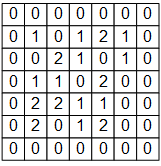
如果使用基于全连接层的模型,我们需要为每个输入信号分配一个权重,即建模一个神经元需要 个权重,并生成一个输出信号。 如果一层包含 个神经元,则需要 个权重,并生成 个输出信号。
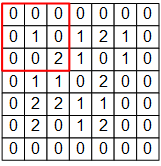
在 CNN 的卷积层中,我们通过以下方式建模一个卷积层的神经元:如下图所示, 的红框代表该神经元的感受野 (Receptive Field)。将红框内对应位置的权重相乘并相加,得到一个数值。然后,让红框依次向右和向下滑动,并按相同方式计算,得到一个新的输出矩阵。这样,我们只需 个权值,即可生成一个输出信号。
2卷积层的数学表示
详细来说,假设
w_{1,1}&w_{1,2}&w_{1,3}\\
w_{2,1}&w_{2,2}&w_{2,3}\\
w_{3,1}&w_{3,2}&w_{3,3}
\end{matrix}\right],\quad 偏置项\;b$$
那么对于红框所示的位置,输出信号为
$$a_{1,1}=\sum\left[\begin{matrix}
0\times w_{1,1}&0\times w_{1,2}&0\times w_{1,3}\\
0\times w_{2,1}&1\times w_{2,2}&0\times w_{2,3}\\
0\times w_{3,1}&0\times w_{3,2}&2\times w_{3,3}
\end{matrix}\right]+b$$
然而,$3\times3$ 的范围显然不足以覆盖整个图像,因此我们采用滑动窗口的方法。
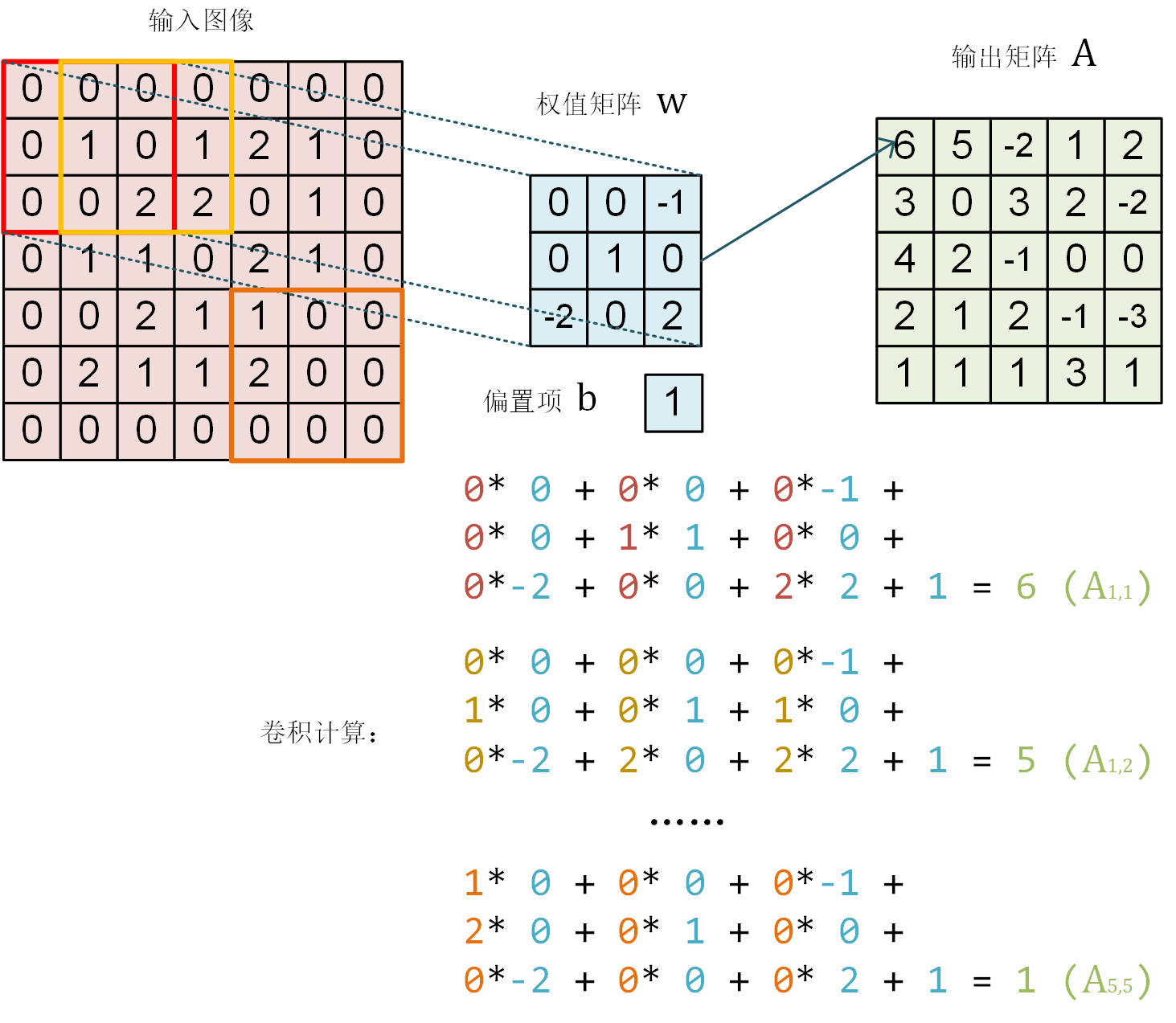
使用相同的参数 $W$,将红框在图像中从左到右滑动,进行逐行扫描,每滑动到一个位置就计算一个值。
例如,当红框向右移动一个单位时,
$$a_{1,2}=\sum\left[\begin{matrix}
0\times w_{1,1}&0\times w_{1,2}&0\times w_{1,3}\\
1\times w_{2,1}&0\times w_{2,2}&1\times w_{2,3}\\
0\times w_{3,1}&2\times w_{3,2}&1\times w_{3,3}
\end{matrix}\right]+b$$
因此,与一般神经元只能输出一个值不同,卷积层神经元可以输出一个 $5\times5$ 的矩阵。
## TensorFlow 实践
下面,我们使用 TensorFlow 验证上图的计算结果。
```py
import numpy as np
import tensorflow as tf
from tensorflow.keras import models, layers
W = np.array([[
[0, 0, -1],
[0, 1, 0],
[-2, 0, 2]
]], dtype=np.float32)
b = np.array([1], dtype=np.float32)
model = models.Sequential([
layers.Conv2D(
filters=1,
kernel_size=[3, 3],
kernel_initializer=tf.constant_initializer(W),
bias_initializer=tf.constant_initializer(b))
])
image = np.array([
[0, 0, 0, 0, 0, 0, 0],
[0, 1, 0, 1, 2, 1, 0],
[0, 0, 2, 2, 0, 1, 0],
[0, 1, 1, 0, 2, 1, 0],
[0, 0, 2, 1, 1, 0, 0],
[0, 2, 1, 1, 2, 0, 0],
[0, 0, 0, 0, 0, 0, 0]
], dtype=np.float32)
image = np.expand_dims(image, axis=0)
image = np.expand_dims(image, axis=-1)
output = model(image)
print(tf.squeeze(output))
```
程序运行结果为
```
tf.Tensor(
[[ 6. 5. -2. 1. 2.]
[ 3. 0. 3. 2. -2.]
[ 4. 2. -1. 0. 0.]
[ 2. 1. 2. -1. -3.]
[ 1. 1. 1. 3. 1.]], shape=(5, 5), dtype=float32)
```
## 多通道卷积
以上假设图片都只有一个通道 (例如灰度图片),但如果图像是彩色的 (例如有 RGB 三个通道) 该怎么办呢?此时,我们可以为每个通道准备一个 $3\times3$ 的权值矩阵,即一共有 $3\times3\times3=27$ 个权值。对于每个通道,均使用自己的权值矩阵进行处理,输出时将多个通道所输出的值进行加和,再加上偏置项,共 28 个权值。下面通过代码验证一下。
```py
model = models.Sequential([
layers.Conv2D(
input_shape=(7, 7, 3),
filters=1,
kernel_size=[3, 3])
])
model.summary()
```
程序运行结果为
```text
Model: "sequential"
_________________________________________________________________
Layer (type) Output Shape Param #
=================================================================
conv2d (Conv2D) (None, 5, 5, 1) 28
=================================================================
Total params: 28
Trainable params: 28
Non-trainable params: 0
_________________________________________________________________
```
从上述输出可以看出,每次卷积后,结果图像的四周都会比原始图像少一圈。我们可以通过设置 padding 策略来解决这个问题。当 padding 参数设为 same 时,系统会用 0 补齐周围缺失的部分,从而使输出矩阵的大小与输入一致。
```py
model = models.Sequential([
layers.Conv2D(
input_shape=(7, 7, 3),
padding='same',
filters=1,
kernel_size=[3, 3])
])
model.summary()
```
程序运行结果为
```text
Model: "sequential"
_________________________________________________________________
Layer (type) Output Shape Param #
=================================================================
conv2d (Conv2D) (None, 7, 7, 1) 28
=================================================================
Total params: 28
Trainable params: 28
Non-trainable params: 0
_________________________________________________________________
```
此外,还可以通过 strides 参数设置步长 (默认为 1)。
```py
model = models.Sequential([
layers.Conv2D(
input_shape=(7, 7, 3),
strides=2,
filters=1,
kernel_size=[3, 3])
])
model.summary()
```
程序运行结果为
```text
Model: "sequential"
_________________________________________________________________
Layer (type) Output Shape Param #
=================================================================
conv2d (Conv2D) (None, 3, 3, 1) 28
=================================================================
Total params: 28
Trainable params: 28
Non-trainable params: 0
_________________________________________________________________
```